The section allows you to view previously created mailings, track their status, and quickly find the messages you need. This helps control sent notifications, return to saved drafts, and analyze mailing performance.
At the top of the page there are filtering and search tools. Using them you can quickly find the desired mailing or display only certain types of messages.
The following options are available:
- search by companies — allows you to find mailings related to a specific company;
- mailing type — in the dropdown you can choose: all, one-time or automatic (scenarios);
- time range — allows you to specify the date period for which mailings should be displayed.
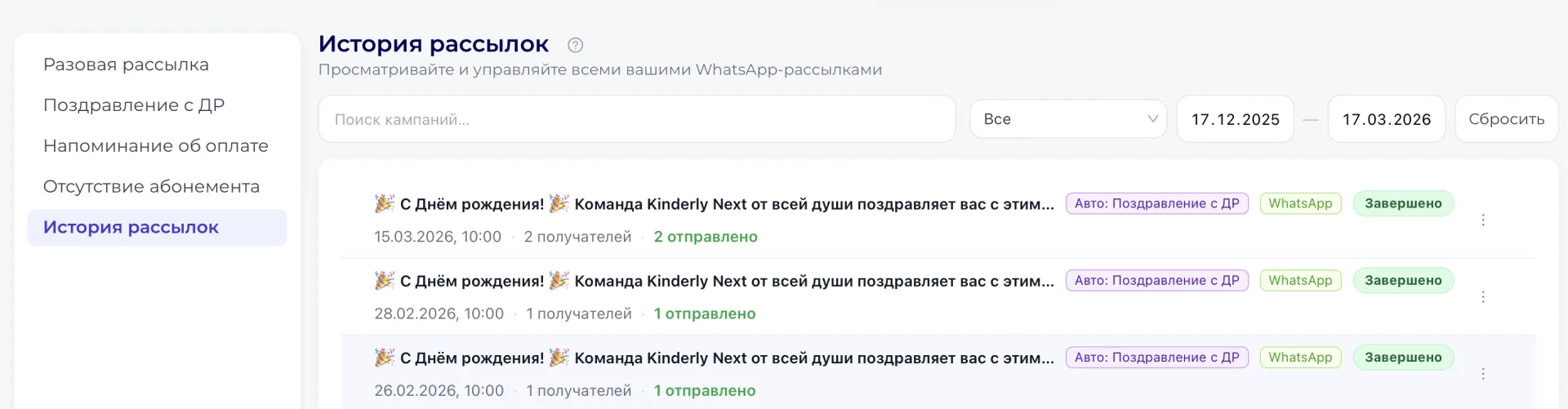
The "Reset" button clears the selected filters and returns the display to all mailings.
Below is the "Drafts (Черновики)" section, where mailings saved without sending are shown. They can be opened, edited, and launched later.
Under the drafts section is the list of mailings, which shows created and sent messages. In this list you can view the mailing history and quickly go to the desired entry to see detailed information.
Important to consider
- Both sent mailings and saved drafts are shown in the section. If a mailing was saved without sending, it will remain in the "Drafts (Черновики)" section until it is launched.
- The filters at the top of the page help quickly find the required mailing. If the list is not displayed completely or the desired mailing is not visible, check the selected mailing type or the set date range.